
FunnelSights vs Google Analytics 4
Compare FunnelSights and Google Analytics 4 across privacy, automatic tracking, AI traffic visibility, reporting, and pricing. Explore how FunnelSights helps uncover content opportunities, where GA4 offers more depth, and which analytics tool fits your website’s needs.
You open your analytics to make a decision. Which pages bring people in? What do they click? Where do they get stuck? Is anyone arriving from ChatGPT?
Google Analytics 4 can answer many of those questions. It also gives you an extensive system for advertising measurement, audience building and custom analysis. The question is how much of that system your team needs.
Key takeaways
FunnelSights combines website analytics, automatic click tracking, Demand Mining, and AI traffic reporting.
It uses no cookies or localStorage. Visitor identifiers rotate daily, so it does not recognize the same visitor across multiple days.
Demand Mining highlights site-search terms, broken-link dead ends, and abandoned documentation pages to help identify content worth improving.
AI assistant referrals and AI crawler activity appear in separate reports. A crawler visit does not prove your content appeared in an AI answer.
FunnelSights starts at $30/month. GA4’s free standard product, Google Ads integration, and BigQuery export make it a stronger fit for advertising and advanced data analysis.
FunnelSights brings website reporting, automatic click tracking, Demand Mining and AI traffic visibility into one product. It uses no cookies or localStorage, and its visitor identifiers change daily.
If your priority is understanding and improving a website, that combination is worth a look. If your work depends on Google Ads, long-term user identification or SQL analysis, GA4 has advantages you should weigh before switching.
Here’s how the two compare.
FunnelSights and GA4 at a glance
What matters | FunnelSights | Google Analytics 4 | |
|---|---|---|---|
$30/month; 14-day trial without a card | Standard product is free | ||
Basic installation | One deferred script tag, with a live installation check | Google tag; Tag Manager is optional | |
Cookies and browser storage | No cookies or localStorage | Typically uses analytics cookies; behavior changes with consent settings | |
Visitor recognition | Domain-specific identifier with a salt that changes every 24 hours | Supports identifiers that can recognize returning users across days | |
Automatic interactions | Button and link clicks, downloads, form submissions, scroll depth and engaged time | Enhanced measurement includes outbound clicks, downloads, forms, site search and scroll events | |
Reporting approach | Collected events; no behavioral modeling to fill gaps | Observed data, with behavioral modeling available for eligible consent-mode setups | |
Data freshness | Reports update every 15 minutes, plus a Realtime view | Realtime available; standard intraday processing typically takes 2–6 hours | |
Bots | Dedicated Bots report; referrer spam is dropped | Known bots are excluded automatically; their excluded volume is not shown | |
Retention | Aggregated reports up to 5 years; raw events up to 6 months | Standard user/event retention settings are 2 or 14 months; standard aggregated reports are outside that limit | |
Advertising and data exports | Not a replacement for an advertising or raw SQL stack | Google Ads integration and BigQuery export |
Google documents these distinctions in its tag setup guide, enhanced measurement guide, consent mode documentation, data freshness guidance, bot exclusion policy and retention documentation.
Start with the questions your team asks every week
FunnelSights includes Traffic, Pages, Sources, Locations and Devices reports for the basics. Goals & Events, Segments, Drop-off and User Journey reports let you look more closely at what happens after someone arrives, including flows and funnels.
Automatic click capture records button and link clicks without tagging each one individually. You can examine those interactions by page, country, source and device. Outbound links, file downloads, form submissions, scroll depth and engaged time are also tracked, with support for single-page applications and hash routing.
That gives you a useful starting point for investigating a page. If people reach your pricing page but rarely click its main button, you have a specific interaction to examine alongside traffic sources and devices.
GA4 also automates common interactions. Its enhanced measurement covers several of the same basics, including site search and form events. FunnelSights’ distinction here is broader button and link autocapture alongside the reports you use to investigate them—not the claim that GA4 requires custom code for every event. See Google’s enhanced measurement events.
For agencies and teams managing several domains, the All Sites view brings those sites onto one screen.
Find what visitors could not find
A pageview tells you someone arrived. A search term can tell you what they hoped to find.
FunnelSights’ Demand Mining brings together three useful signals:
Site-search terms: the words visitors use when looking for something on your site.
404 dead ends: missing pages traced back to the page containing the broken link.
Abandoned documentation pages: places to investigate whether the content is helping readers move forward.
For example, repeated searches for an integration could be a reason to make its documentation easier to find. A broken link leading to a 404 gives you a concrete repair to make. An abandoned help page gives you a place to investigate, although abandonment alone does not prove the content failed.
FunnelSights also generates content recommendations using rules applied to your own numbers. The value is a shorter path from reviewing traffic to choosing the next page to improve.
See AI referrals and AI crawlers separately
Someone clicking a link in an AI assistant and a bot crawling your website are different kinds of activity. FunnelSights gives them separate reporting.
The AI Assistants channel groups identifiable traffic from tools such as ChatGPT and Perplexity. It helps you see when those assistants send people to your website.
The Bots report shows identified crawlers such as GPTBot and ClaudeBot, including crawlers that do not execute JavaScript. That is a different question: which automated systems are accessing your content?
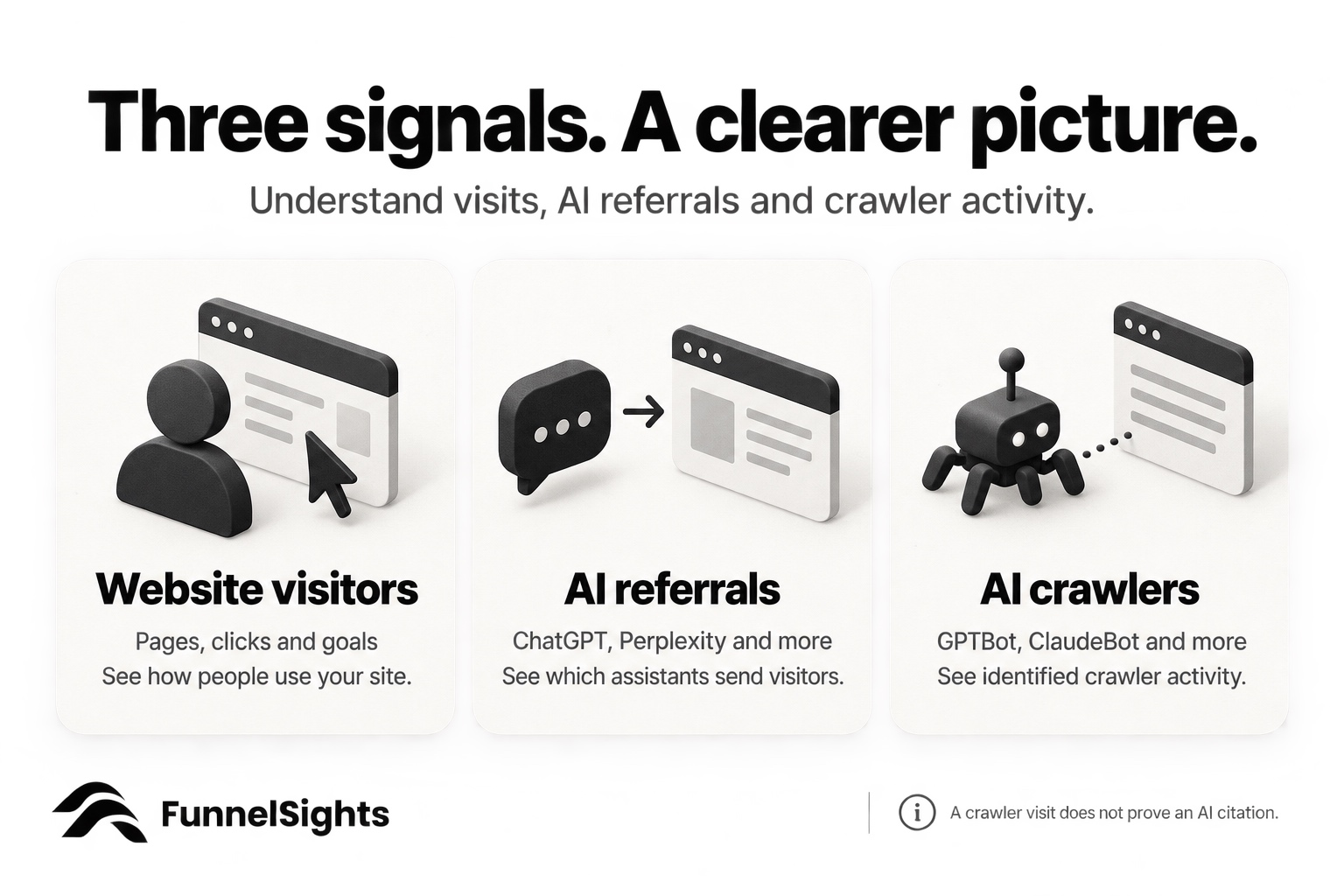
Visitor behavior, assistant referrals and crawler activity answer different questions. A crawler visit does not prove your page appeared in an AI answer.
Referral reporting depends on an identifiable source, so it cannot reveal every visit influenced by an AI tool. Keeping that distinction clear makes these reports more useful: you can evaluate the signals you have without treating them as proof of visibility everywhere.
GA4 automatically excludes known bots and spiders and does not show how much known bot traffic it excluded. FunnelSights adds a dedicated place to inspect crawler activity. Google’s bot exclusion documentation.
Privacy and visitor recognition
FunnelSights does not use cookies or localStorage. It does not store IP addresses or user agents. Instead, it uses a salted visitor hash that includes the domain. The salt changes every 24 hours and is deleted after 48 hours.
Including the domain prevents that identifier from being shared across different sites. Rotating the salt limits continuity over time.
That has a reporting consequence: FunnelSights recognizes unique visitors within a day, rather than deduplicating the same person across days. Someone visiting on Monday and returning on Tuesday can count on both days. Daily uniques should not be read as a count of distinct people across a whole month.
Aggregated reports contain no visitor identifier and are retained for up to five years. Raw events are retained for up to six months. FunnelSights is hosted in the United States.
The product ships without a consent banner. That describes the product’s behavior; whether your website needs consent depends on the full implementation and applicable requirements, including other tools you run.
Understand what the numbers represent
FunnelSights reports collected events without adding behavioral modeling to fill collection gaps. Counts and calculated metrics come from the activity it receives.
That does not mean any analytics tool sees every visit. Blockers, network failures and implementation issues can prevent events from arriving. FunnelSights supports proxying collection through your own domain, but that is not a promise of complete coverage.
GA4 can include modeled behavior when a consent-mode implementation meets Google’s eligibility requirements and uses the appropriate reporting identity. It is not accurate to describe every GA4 report as modeled. Google provides a data-quality indicator and options to show or hide behavioral modeling. Google’s behavioral modeling guide.
Freshness also needs context. FunnelSights refreshes reports every 15 minutes and includes a Realtime view. GA4 has Realtime too; its standard intraday processing is typically 2–6 hours, while full processing can take 24–48 hours. Google’s data freshness guide.
Get started without rebuilding every event
FunnelSights installs with one deferred script tag. Installation guides cover WordPress, Webflow, Shopify, Squarespace, Wix, Next.js and GTM, with paste-in prompts for coding assistants and a live check to confirm installation.
If your site already sends events through dataLayer or gtag(), FunnelSights can receive those events automatically and record purchase values as revenue. You should still check your key events and purchase values during setup, especially if your current implementation uses custom conventions.
The deferred script loads without blocking HTML parsing. Its download size is one part of its performance cost; page-speed outcomes also depend on execution, other scripts and the page itself.
Where GA4 is the better fit
GA4 deserves serious consideration when your analytics work depends on advertising or custom data analysis.
Its Google Ads integration supports a connected advertising workflow, while BigQuery export lets you query event data in a data warehouse. BigQuery usage can carry separate costs. Google Analytics integrations, BigQuery export documentation.
FunnelSights is not the right replacement if you need user-level or cross-device tracking, remarketing audiences or raw SQL export. Its daily visitor identity also makes it unsuitable when recognizing the same visitor over a longer period is central to your analysis.
And GA4’s standard product is free. If it already answers your questions and fits your workflow, a paid alternative needs to offer a practical improvement you can see.
What FunnelSights costs
Every FunnelSights plan includes every report. Plans differ by event allowance and the number of sites.
Plan | Monthly billing | Monthly equivalent, billed annually | Events per month | Sites |
|---|---|---|---|---|
Starter | $30 | $22.50 | 250,000 | 1 |
Growth | $60 | $45 | 500,000 | 3 |
Business | $99 | $74.25 | 1.5 million | 10 |
Enterprise | Custom quote | Custom quote | 1.5 million+ | 10+ |
Pageviews, clicks—including automatically captured clicks—and custom events count toward the allowance. Engagement pings are free. That distinction matters when estimating usage: 250,000 events is not the same as 250,000 pageviews.
The trial lasts 14 days and requires no credit card.
Is FunnelSights right for your website
FunnelSights is a strong candidate when you want cookie-free website analytics, automatic interaction tracking, a clearer view of content gaps and dedicated reports for AI referrals and crawlers. Its All Sites view also makes it relevant for teams overseeing several websites.
GA4 is a stronger candidate when your priorities are Google Ads, persistent user analysis, remarketing or a warehouse-based reporting workflow.
Use the trial to test questions you already need answered. Check which sources bring visitors, what they click on a key page, and whether Demand Mining surfaces something worth fixing. If you run both tools during that evaluation, compare their usefulness as well as their totals: identity rules, collection settings and modeling can produce different counts.
Try FunnelSights free for 14 days. No credit card required.
FAQs
What is the difference between FunnelSights and Google Analytics 4?
FunnelSights focuses on website reporting, automatic interaction tracking, content opportunities, and AI traffic visibility. GA4 offers a broader measurement system with advertising integrations, audiences, and data warehouse exports.
Does FunnelSights use cookies?
No. FunnelSights uses neither cookies nor localStorage. It uses domain-specific visitor identifiers with a salt that changes every 24 hours.
Can I remove my consent banner after switching to FunnelSights?
FunnelSights ships without a consent banner, but switching analytics tools does not automatically remove your website’s consent requirements. Those depend on your implementation, other tools, and applicable rules.
Can FunnelSights track traffic from ChatGPT and other AI tools?
Its AI Assistants channel groups identifiable referrals from tools such as ChatGPT and Perplexity. A separate Bots report shows identified crawler activity, including GPTBot and ClaudeBot. These reports do not reveal every AI-influenced visit or prove an AI citation.
Can FunnelSights use my existing GA4 events?
FunnelSights can automatically receive events sent through dataLayer and gtag() and record purchase values as revenue. Check your key events during setup, especially if you use custom event conventions.
Does FunnelSights count returning visitors across days?
No. Visitor recognition is limited to a day because its identifier salt rotates daily. Someone returning on another day can be counted again, so daily unique counts should not be interpreted as distinct people across a month.
How much does FunnelSights cost?
Monthly plans start at $30 for 250,000 events and one site. Every plan includes every report, and a 14-day trial is available without a credit card. Pageviews, clicks, and custom events count toward usage; engagement pings are free.